Still have questions?
Come chat with us and we will get back to you as soon as possible!

Nuno Paiva
Game Integration Specialist @ Shockbyte

How to Install Mods on your Palworld Client
Palworld supports mods on the client side too, letting you customise your own game experience with new items, creatures, quality-of-life tweaks, and more. Client-side mods are now installed directly through the Steam Workshop, so this guide walks you through browsing, subscribing to, and enabling mods without any manual file downloads.
Note
Once you follow the steps in this guide, please refer to our guide that explains How to Install Mods on your Palworld Server to ensure your Shockbyte server is setup correctly.
#Finding the Workshop Page
- Open Steam and go to your Library.
- Click on Palworld.
- Click Workshop on the right-hand side of the game page.
- Select the desired mod you wish to install and select the
+button. It should automatically install the mod. For this example we are using theNo More Stuck Palsmod: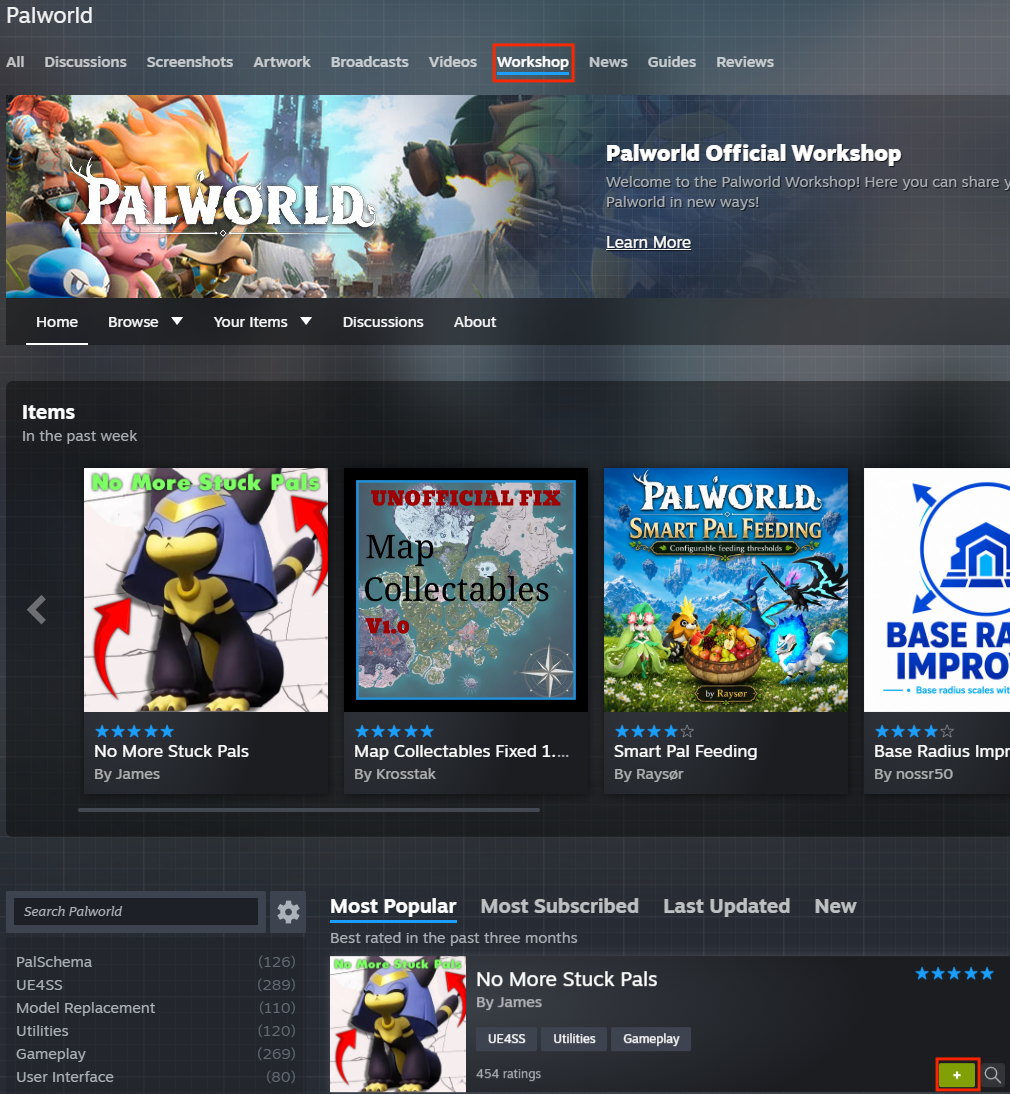
#Enabling Mods In-Game
- Launch Palworld.
- Go to Options > Mod Management and turn
Enable Modon. - Your mod list will no longer be greyed out. Check the box next to each mod you want active.
- Click Save. The game will restart and load your enabled mods.
If a mod is causing crashes and you can't reach the in-game menu, you can also Unsubscribe from it in Workshop; it'll be removed the next time you launch Palworld.