Still have questions?
Come chat with us and we will get back to you as soon as possible!

Shockbyte
Support Team
How to Configure your Necesse Server
There is a range of configuration options available to Necesse server owners that allow them to give their players a more unique experience.
Configuration options range from changing the server MOTD to changing the amount of Demonic Ingots required to craft a pickaxe. All configurable settings can be accessed using the Shockbyte control panel.
#Accessing your Necesse Server Settings
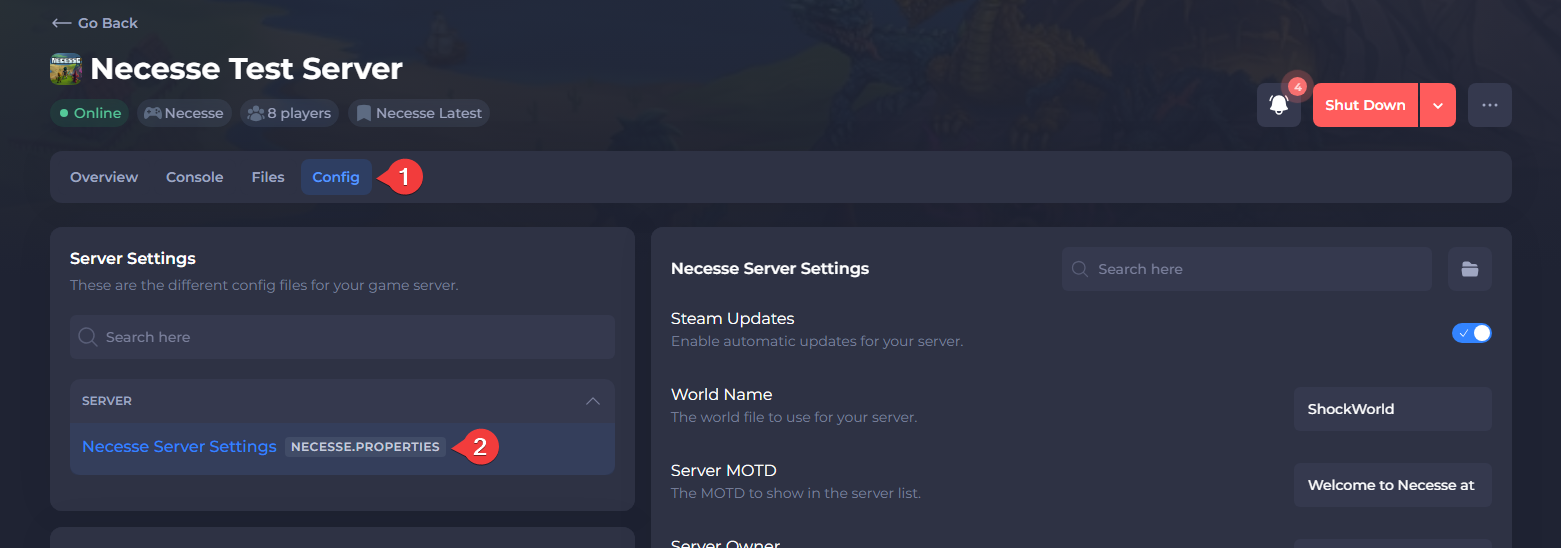
Configurable options can be found in the Necesse Server Settings section of your server control panel.
-
Open your Server Control Panel.
-
Navigate to Config and open Necesse Server Settings.
#Configuring your Server Settings
The table below lists all of the server settings in the config editor, along with their description.
| Setting | Option |
|---|---|
| Steam Updates | Enabled by default. Allows you to toggle automatic Steam updates and file validations. |
| World Name | Name of the active world. Changing this to a new name will generate a new world. |
| Server MOTD | The MOTD (Message of the Day) shown in chat after joining the server. |
| Server Owner | The in-game username of the player designated as the server owner. |
| Password | Sets a password to connect to your server. |
| Pause When Empty | Determines whether or not the server should pause time when nobody is online. |
| Give Clients Power | If the server should check client actions, this acts as a sort of anti-cheat. When set to Off, it will give a much smoother experience for clients. |
| Workshop Mod IDs | Allows you to specify Steam Workshop Mod IDs that will be installed on your server when it next starts. |
| Allow Cheats | Determined if certain cheat commands are enabled on the world. Enabling this setting is permanent and disables achievements. |
| Difficulty | Sets the difficulty of the world. This determines how tough enemies are and how forgiving the world is. |
| Death Penalty | Sets the death penalty. Options include no penalty, dropping materials, dropping inventory, or hardcore (permanent death). |
| Raid Frequency | Sets the frequency of raids on player settlements. |
| Survival Mode | Toggle if mob spawning is disabled (i.e. no monsters / creatures appear). |
| Player Hunger | Determines if players get hungry and need to eat, activating the hunger mechanic. |
| Enable PvP | Disabled by default. Allows you to enable PvP. |
| Allow Outside Characters | Determines whether characters created outside of the world may join. |
| Creative Mode | Allows you to enable creative mode. Allows free building without resource constraints. |
| Disable Mob AI | Determines whether mob AI/behaviour is disabled (mobs may exist but not act). |
| Day Time Modifier | Multiplier for day length. A higher value lengthens daytime relative to default. |
| Night Time Modifier | Multiplier for night length. A higher value lengthens nighttime relative to default. |
To learn more about Necesse server hosting, you can browse our library of Knowledgebase articles here.