Still have questions?

Shockbyte
Support Team
How to Enable and Manage a Whitelist on your Vintage Story Server
Whitelisting allows you to control who can access your Vintage Story server. When enabled, only players who are added to the whitelist will be able to join your server.
#Setting Up a Whitelist
Vintage Story servers will have the whitelist enabled by default. However, this can be toggled within the Vintage Story Server Settings section of your server's config tab.
- Access your Control Panel and Stop your server.
- Navigate to the Config tab, select the Vintage Story Server Settings.
- Locate the
Whitelist Modeconfig select your desired Whitelist mode.
- Save and restart your server to ensure the changes are applied.
#Managing a Whitelist
When the whitelist is enabled, only players who are added to the whitelist are able to connect to the server.
You can add or remove players from the whitelist using one of the following commands. These commands can be entered in your server console or via an admin with OP permissions in the in-game chat.
/whitelist add <Username>Replace<Username>with the name of the player you'd like to whitelist./whitelist remove <Username>Replace<Username>with the name of the player you'd like to remove from the whitelist.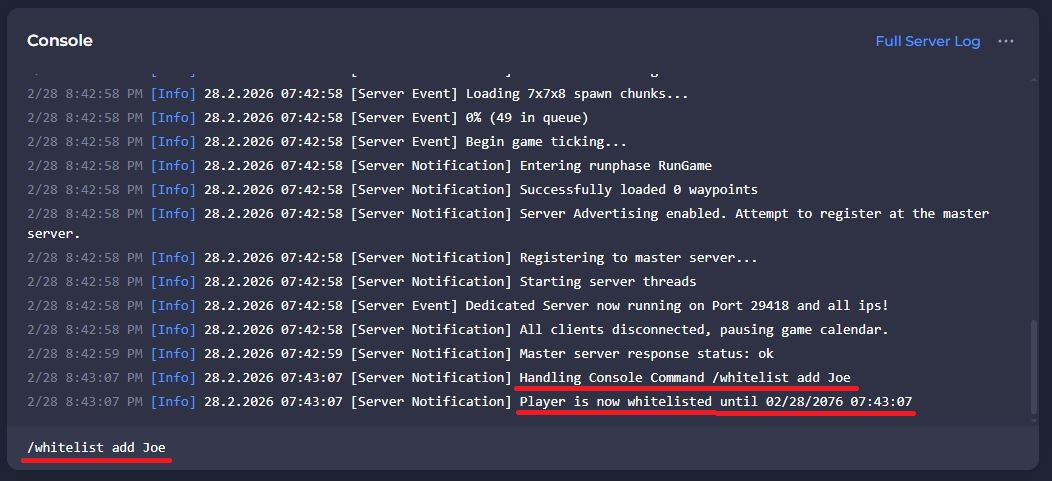 Once a player has been added to the whitelist, they can now connect to your server.
If you require any further assistance, please contact our support at: https://shockbyte.com/billing/submitticket.php