How to Switch Between Practice, Warmup, and Scrim Modes on your Counter Strike 2 Server
Still have questions?
Come chat with us and we will get back to you as soon as possible!

Nuno Paiva
Game Integration Specialist @ Shockbyte
How to Switch Between Practice, Warmup, and Scrim Modes on your Counter Strike 2 Server
Our Counter Strike 2 servers come with pre-configured settings for practice sessions, scrims, and warmups - making it easy to host matches or train with your team. You can switch between these setups instantly using the Quick Actions available right from your control panel.
#Available Modes
With just one click, you can instantly switch between:
- Practice Mode – Enables infinite nades, no round timer, no freeze time, and more for utility and aim practice.
- Scrim Warmup – Great for warming up with teammates before a match, includes basic configs and a warmup timer.
- Scrim Match – Loads a full competitive-ready config with settings suitable for 5v5 matches.
- Add/Remove Bots – Instantly populate or empty the server of bots.
- Custom – Create your own Quick Action to run any command you like, such as loading a custom config, switching maps, restarting rounds, etc.
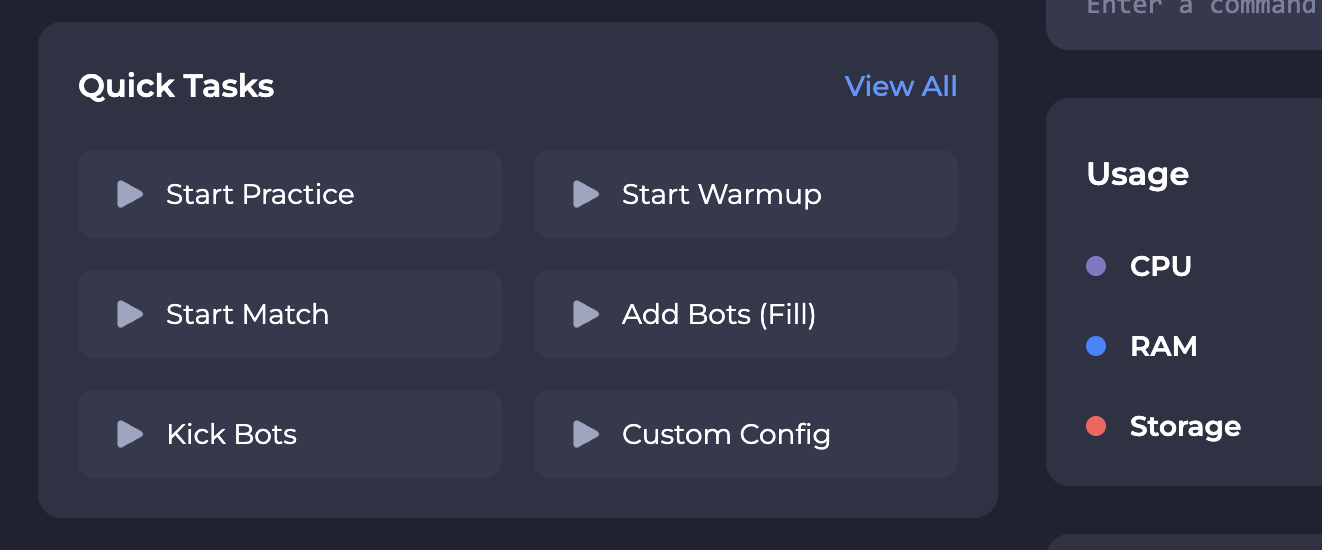
These are all available in your server's Quick Tasks tab.
#Using Quick Actions
- Head to your control panel.
- On your server dashboard, go to the Quick Tasks tab.
- Click any task such as
Start PracticeorStart Warmupto instantly apply it to your server.
Tip
You can drag tasks from the All Tasks section into Pinned Tasks. These will then show up directly on your server's overview dashboard for even quicker access!
#Bonus Tip: Practice Your Smokes
When using the Practice config, we recommend visiting: https://jumpthrow.pro/
This site is packed with community-submitted smoke lineups for all major maps — ideal for utility practice and solo warmups!
If you require any further assistance, don't hesitate to get in touch with our support at: https://shockbyte.com/billing/submitticket.php