Still have questions?
Come chat with us and we will get back to you as soon as possible!

Shockbyte
Support Team

How to use the Shockbyte Self-Serve Refund Feature
At Shockbyte, we offer an automated Self-Serve Refund feature if you decide your service isn’t the right fit after purchase.
Having trouble with your server?
If you’re experiencing any issues with your server, please consider reaching out to our support team beforehand. We are happy to assist you in resolving any issues as soon as possible.
#Self-Serve Refund Eligibility
Our automated refund feature is available to customers who are within the first 72-hours of purchasing their service. If you're still within this window, you can follow the next steps.
Option Unavailable
If this option isn’t available, you can reach out to our support team to request a refund. Our team will review your request and contact you with any updates or required next steps.
#Using the Self-Serve Refund Feature
-
Open the Control Panel of the server you wish to refund.
-
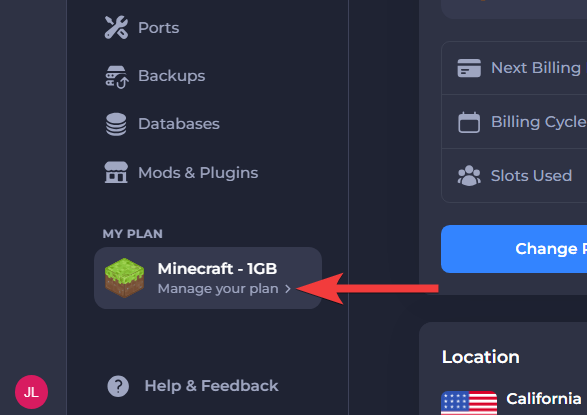
Select Manage your plan on the left sidebar.
-
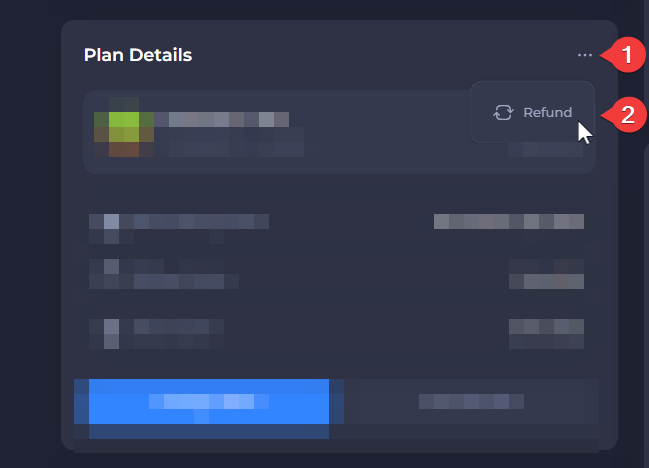
Click the three dots in the Plan Details menu.
-
Select the Refund button to open the self-serve refund menu.
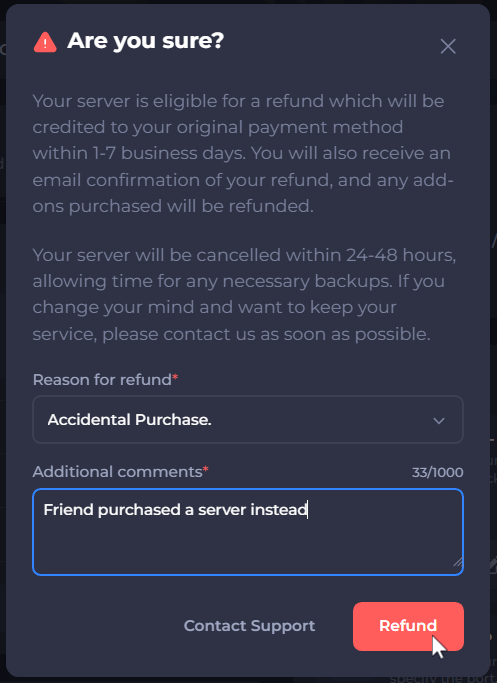
- Enter the Reason for a refund, then select Refund to finalize the process.
Providing additional information about the reason for your refund is invaluable to our team. We regularly review this feedback carefully to improve our services and customer experience.
That's it! Once the steps are complete, you’ll receive a confirmation email and the refund will be processed. It may take up to 10 business days for the refund to appear in your account.