Still have questions?
Come chat with us and we will get back to you as soon as possible!

Nathan Franklin
Game Experience Engineer

How to Add Mods to Your Arma Reforger Server
Mods let you add new weapons, vehicles, maps, game modes and custom scenarios to your ARMA Reforger server. Reforger mods come from the Arma Workshop, which Bohemia Interactive runs. You won't find them on the Steam Workshop, even if you own the Steam version of the game.
You add mods by listing them in your server's serverconfig.json file. Your server downloads every mod on the list when it starts, so your players get the same mods when they join.
#Finding a Mod's ID, Name and Version
Each mod you add needs three details: its ID, its name and its version.
- Open the Arma Workshop in your browser.
- Search for the mod you want and open its page.
- Copy the mod's ID, Name and Version from the mod page.
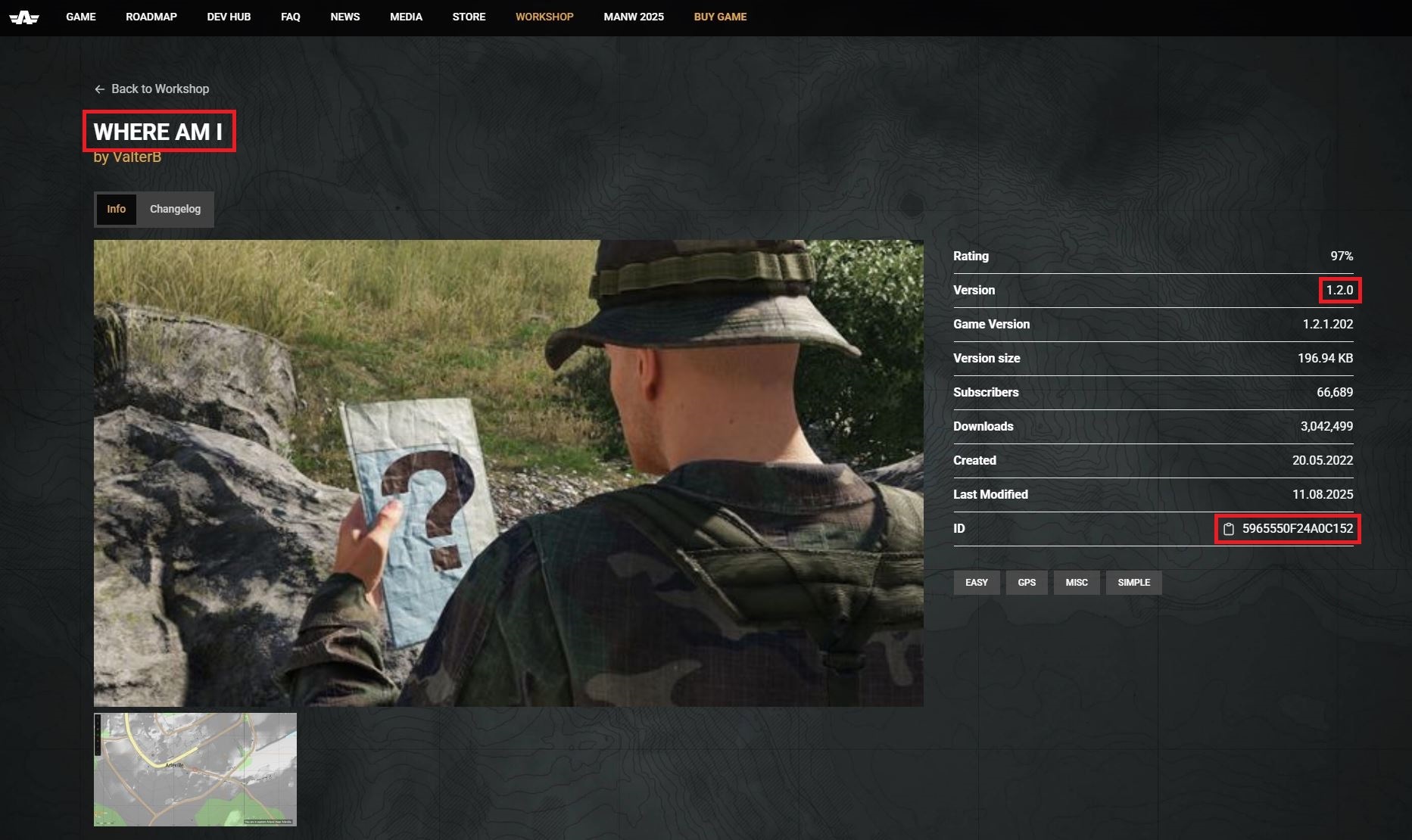
Reforger mod IDs are 16 characters long, for example 591AF5BDA9F7CE8B. If the ID you have is a long number, it probably came from the Steam Workshop and won't work.
Note
When getting your mod Name, this will show up in All Caps on the mod page, but copying the name will still copy the correct capitalisation needed for your config.
#Adding Mods to Your Server
-
Navigate to the Shockbyte Control Panel and open your ARMA Reforger server.
-
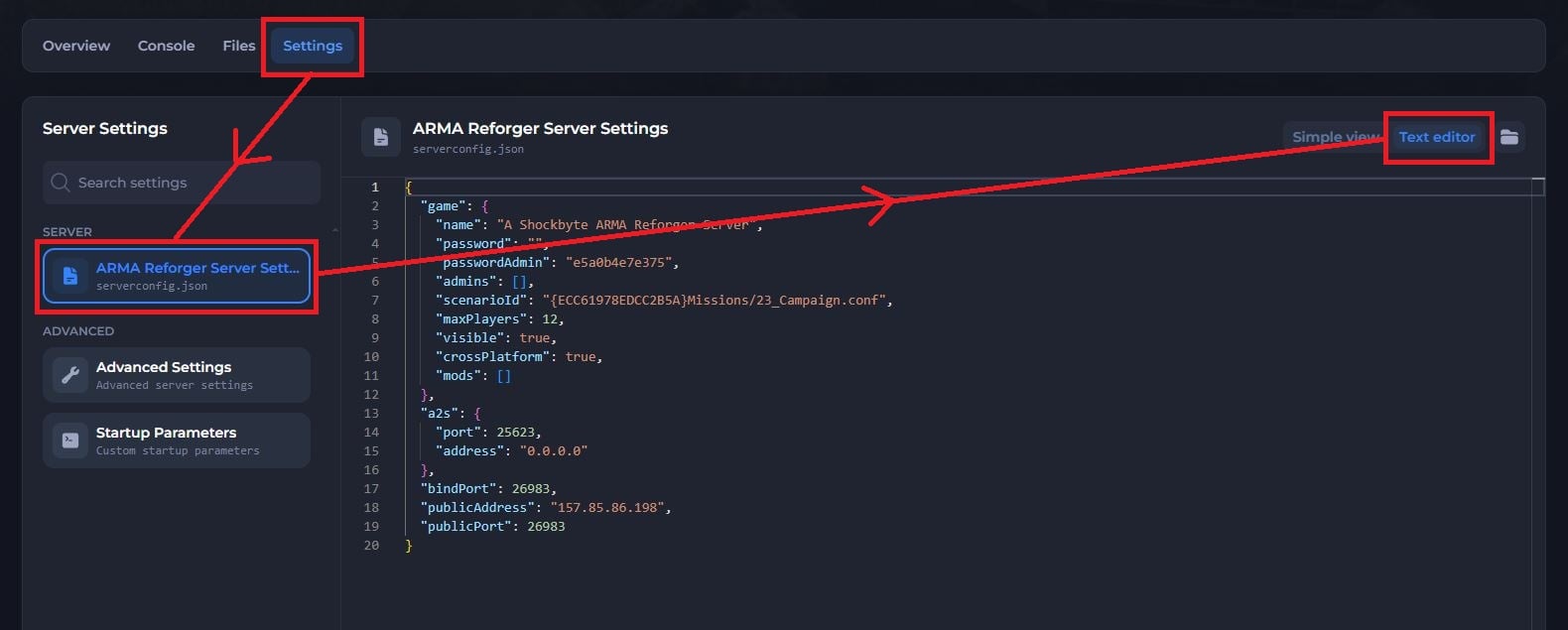
Click Stop to shut down your server and open the Settings tab.
-
Under Server, select ARMA Reforger Server Settings.
-
Click Text editor in the top right.
-
Find the "mods" line inside the "game" section. On a new server, it reads
"mods": []with nothing between the brackets. -
Add an entry for each mod between the brackets, with its ID, name and version, like this:
"mods": [
  {
    "modId": "5965550F24A0C152",
    "name": "Where Am I",
    "version": "1.2.0"
  },
  {
    "modId": "5B3ED33ADA805340",
    "name": "Task Force Mattock Weapons",
    "version": "2.0.7"
  }
]
- Save your changes and Start Server.
Your server downloads the mods as it starts, which can take a few minutes for large mods.
Important
Put a comma between each mod entry, but not after the last one. A missing or extra comma stops your server from reading the file, and the server won't start.
#Using a Custom Scenario From a Mod
Custom scenarios live inside mods. To run one, you need to add its mod to the mods list and set the scenario in the "scenarioId" field.
- Open the scenario's page on the Arma Workshop and note which mod it belongs to.
- Add that mod to your mods list using the steps above.
- In the
serverconfig.jsonconfig, replace the value of the "scenarioId" line with the scenario's ID. You can also paste it into the Scenario ID field in Simple view. - Save your changes and click Start Server.
Important
Check that the scenarioId has no spaces before or after it, inside the quote marks. A stray space makes your server restart in a loop.
#Console Players and Mods
PC, Xbox and PlayStation players can all join a modded Reforger server, but each platform supports a different range of mods. PC players can use nearly any mod. Xbox supports most mods, though players may disconnect more often on heavily modded servers. PlayStation has the most limits, and some mods stop PlayStation players from joining at all.
Mod authors decide which platforms their mods support, and support can change with game updates. If console players are part of your community, test new mods with them before you rely on them.
#Troubleshooting
- My server keeps crashing while it downloads mods.
The Arma Workshop can slow down or time out, especially after a big game update, and your server keeps retrying the failed download. Click the dropdown arrow next to the Stop button and select Kill to force your server to stop, then click Start Server.
- My server restarts in a loop after I set a custom scenario.
Check the scenarioId for spaces before or after the value, and make sure the mod that contains the scenario is in your mods list.
- Console players can't join, but PC players can.
One of your mods is likely incompatible with their platform, most often PlayStation. Remove your mods one at a time, restarting your server and testing with a console player each time, until you find the mod causing it.
- A mod won't download even after a restart.
Check that the mod ID came from the Arma Workshop and not Steam. If the ID is correct, the author may have removed the mod or made it private.
- My mods stopped working after a game update.
Mod authors often need to update their mods after a major game update. Check the mod's Workshop page for a new version, and update the version number in your mods list when one comes out.
- I see errors about missing prefabs or duplicate entities in the console.
If your server runs and players can join, these errors come from the mod itself and won't stop your server.
If you still need help, contact our support team and we'll take a look for you.