Still have questions?
Come chat with us and we will get back to you as soon as possible!

Nuno Paiva
Game Integration Specialist @ Shockbyte
How to Add a Password to your Counter Strike 2 Community Server
Adding a password to your Counter Strike 2 server allows you to control who can join and ensure only authorized players have access. You can also optionally make the server private, which hides it from the Steam and in-game community server browser entirely.
#Setting a Server Password
To restrict access with a password:
-
Navigate to your control panel and Stop your server.
-
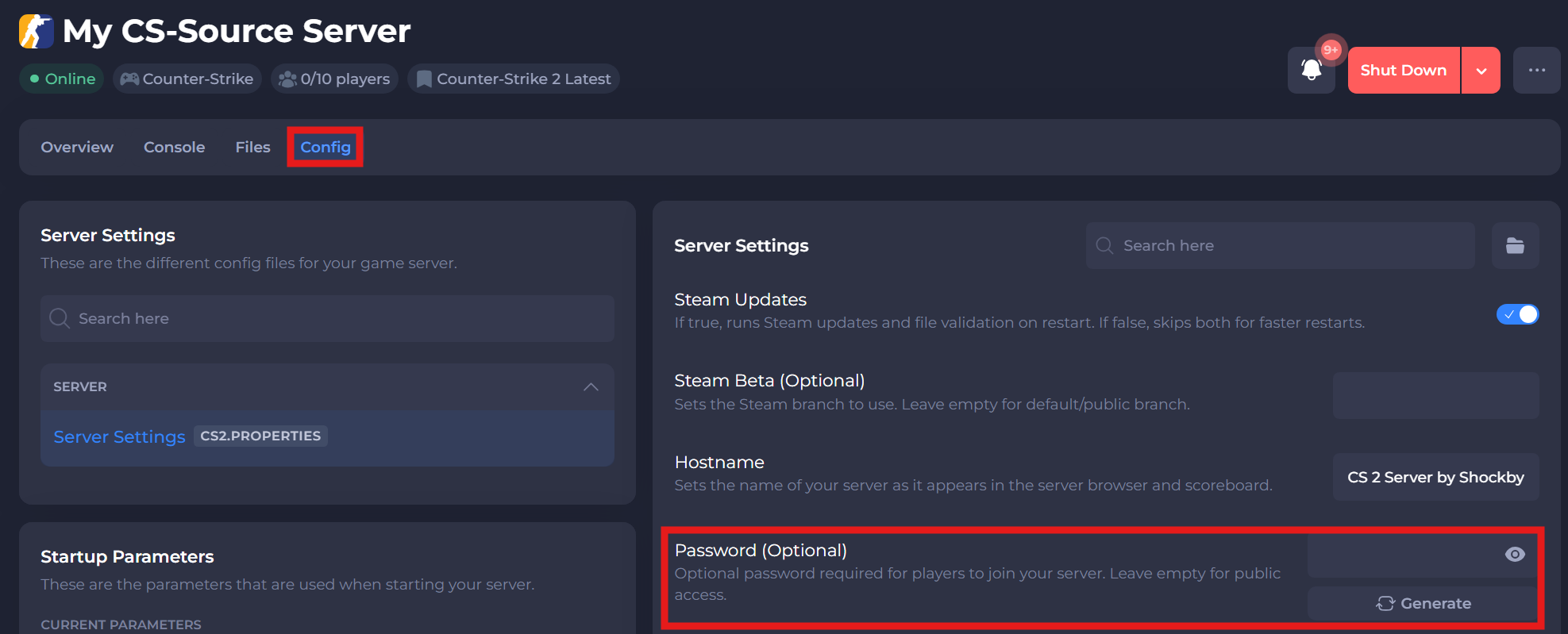
Go to the
Configtab. -
Find the Password field and enter your desired server password.
-
Save the changes and Start your server again.
Players will now be required to enter this password when connecting to your server.
#Making Your Server Private
If you want to completely hide your server from public listings:
-
While in the
Configtab, locate the Private Server option. -
Set this to
true.
-
Save and Start your server.
This hides your server from both the in-game and Steam server browsers, making it only accessible by direct IP connection.
If you require any further assistance, don't hesitate to get in touch with our support at: https://shockbyte.com/billing/submitticket.php