Still have questions?
Come chat with us and we will get back to you as soon as possible!

Nuno Paiva
Game Integration Specialist @ Shockbyte

How to Join your Empyrion Galactic Survival Server
Getting started is simple! You can either join your server by searching for your Server Name in the in-game browser, or by entering your IP and Port directly. Launch the game, head to Multiplayer, and pick whichever method you prefer. Find your server, hit connect, and you'll be ready to start carving out your corner of the galaxy!
#How to find your server IP address
To find the IP address of your server, you will need to log in to your control panel.
Once you've logged into your control panel, copy your server IP and port.
#Joining via the In-Game Server List
-
Open Empyrion - Galactic Survival and select Multiplayer.
-
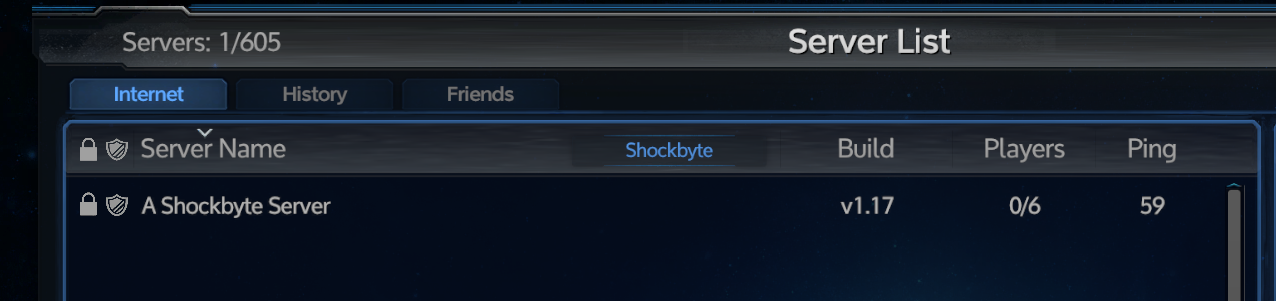
Search for your Server's Name by typing it into the filter box, then wait for it to appear in the list.
-
Select your server and click Connect.
-
(Optional) If your server has a password, enter your password when prompted and click Connect.
#Joining via IP
Alternatively, you can direct connect to your server by following these steps:
-
Open Empyrion - Galactic Survival and select Multiplayer.
-
Enter your server's IP and Port into the Direct IP and Port field at the bottom of the screen.

-
Click Connect.
-
(Optional) If your server has a password, enter your password when prompted and click Connect.
If you require any further assistance, please contact our support at: https://shockbyte.com/billing/submitticket.php