Still have questions?
Come chat with us and we will get back to you as soon as possible!

Shockbyte
Support Team

How to Change Your Playstyle on Your Project Zomboid Server
Project Zomboid has multiple default playstyles available, each playstyle affecting the amount of loot found in houses, the strength and amount of zombies spawned, and much more. You can change your preset playstyle or create your own by following the steps below.
#Choosing a Predefined Playstyle
Each predefined playstyle has different pros and cons. Deciding which one to use may be difficult for new players, so you can compare the key differences in styles below:
| Preset | Description |
|---|---|
| Initial Infection | Resources: Abundant; Zombie Speed: Shamblers; Zombie Senses: Poor; Horde Size: Small; Utility Shut-Off: 6-12 Months |
| One Week Later | Resources: Common; Zombie Speed: Fast Shamblers; Zombie Senses: Poor; Horde Size: Moderate; Utility Shut-Off: 2-6 Months |
| Survival | Resources: Rare; Zombie Speed: Fast Shamblers; Zombie Senses: Normal; Horde Size: Huge; Utility Shut-Off: 0-30 Days |
| Six Months Later | Resources: Rare; Zombie Speed: Fast Shamblers; Zombie Senses: Normal; Horde Size: Large; Utility Shut-Off: Instant |
#Setting a Predefined Playstyle
Once you’ve chosen your preset, you will need to join your server with an admin account.
-
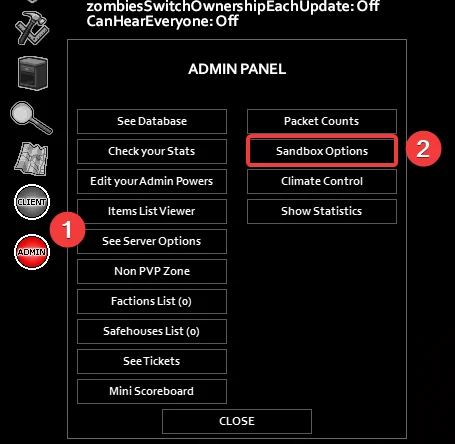
In-game, open the Admin Panel by clicking the red admin button on the left side of the screen.
-
Open Sandbox Options.
-
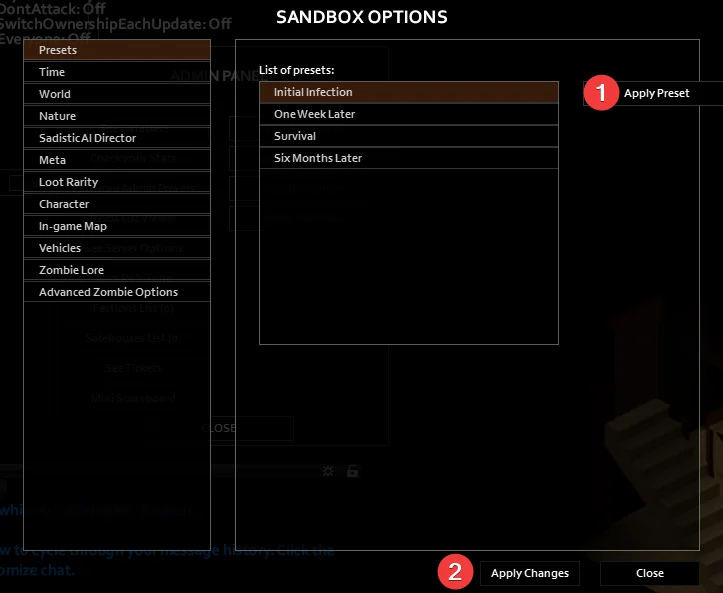
In the Presets tab, select the playstyle you would like to use.
-
Click Apply Preset and then Apply Changes.
#Creating Your Own Playstyle
If you aren’t satisfied with the built-in presets, you can customize individual settings to fit your needs.
- Open Sandbox Options by following the previous steps.
- Choose a base preset to work off of.
- Go through each tab on the left and change your settings accordingly.
- Click Apply Changes and close the tab.
If you require any further assistance, please contact our support at: https://shockbyte.com/billing/submitticket.php