Table Of Contents
Setting a PasswordStill have questions?
Come chat with us and we will get back to you as soon as possible!

Shockbyte
Support Team

How To Set Your Sons Of The Forest Server To Private
Setting your Sons of the Forest server to private allows you to restrict access to select players and prevent uninvited players from joining. Currently, the only way to make your Sons of the Forest server private is by setting a password for your server.
#Setting a Password
You can set a password for your Sons of the Forest server in the control panel.
-
Open your Server Control Panel.
-
Navigate to Config and open Dedicated Server Settings.
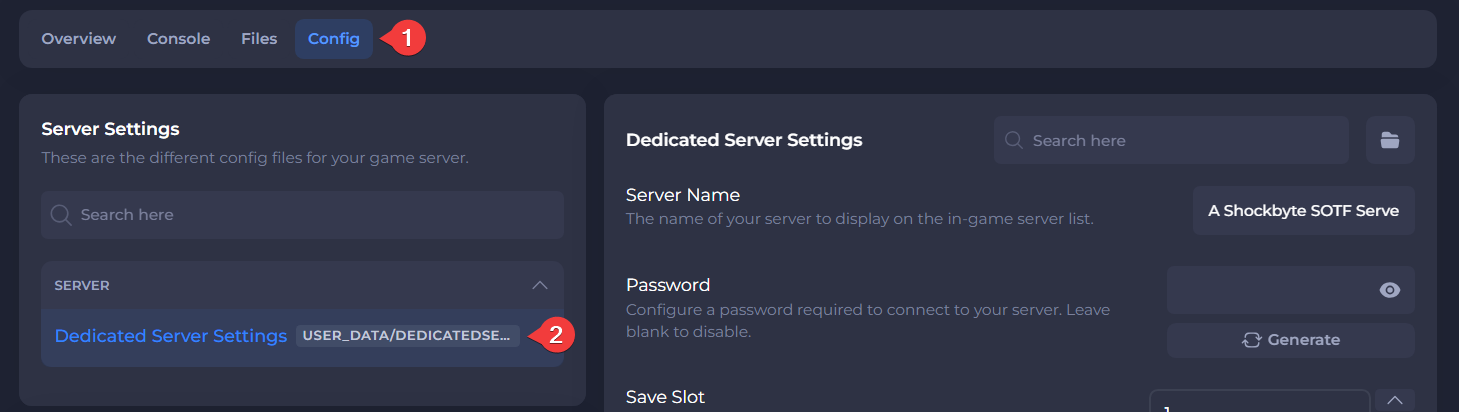
- Enter your desired server password in the Password field.
The Generate button can be used to create a randomized password.
- Save and Restart your server.
After these changes, when you attempt to connect to your server you will now receive a prompt asking for a password.

To learn more about Sons of the Forest server hosting, you can browse our library of Knowledgebase articles here.