Table Of Contents
Adding an AdministratorStill have questions?
Come chat with us and we will get back to you as soon as possible!

Shockbyte
Support Team

How To Add An Admin On Your Sons Of The Forest Server
Sons of the Forest
·Nov 12, 2024
·1 min read
Sons Of The Forest server administrators have access to a range of in-game console commands including the ability to spawn items, become invincible and a whole lot more.
#Adding an Administrator
Administrators can be set by adding their Steam64ID to the ownerswhitelist.txt file.
-
Locate the SteamID64 of the target player by following this guide.
-
Access your control panel and stop your server.
-
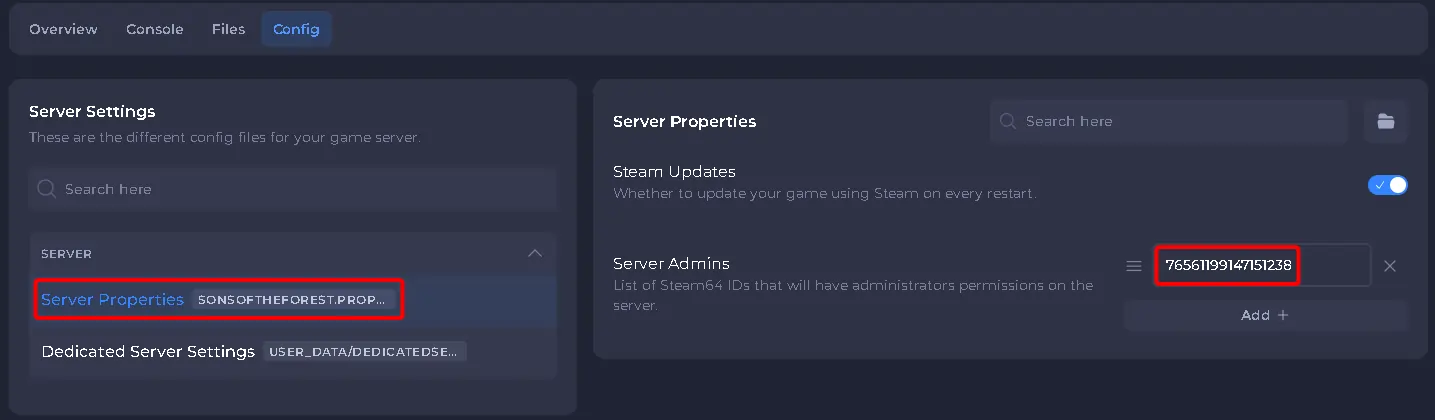
Navigate to Config and open Server Properties.
-
Locate the Server Admins option, add each player their Steam ID on a new line.
-
Save and Start your server.
That’s it! Adding an admin to your Sons of the Forest server is quick and easy.