Still have questions?
Come chat with us and we will get back to you as soon as possible!

Shockbyte
Support Team
Getting Started With Your Stardew Valley Server
Before joining your new Stardew Valley server for the first time, it is important to make sure that all your farm’s settings are configured how you'd like. Making future changes will require you to either manually edit the save file or start a new save.
#Getting Started
-
Open your Control Panel.
-
Stop your server and wait for it to go offline.
-
Navigate to Config and open Stardew Valley Farm Settings.
-
Locate Farm Name and set a new name for your farm.
This is required for the next changes to take effect. Making future changes will require you to either manually edit the save file or start a new save.
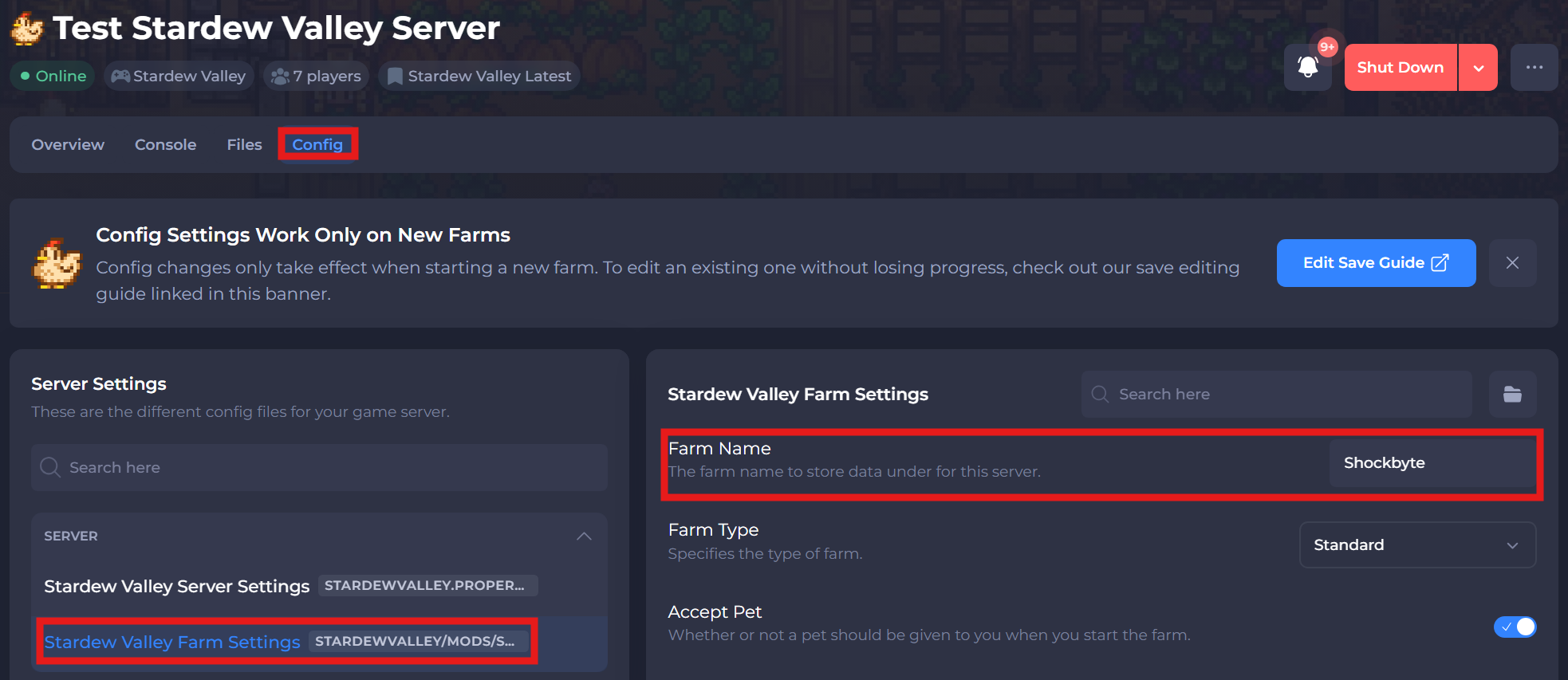
- Configure your desired settings. When done, start the server.
| Setting | Description |
|---|---|
| Farm Name | The farm name to store data under for this server. |
| Farm Type | Specifies the type of farm. |
| Accept Pet | Whether or not a pet should be given to you when you start the farm. |
| Pet Name | The name of the pet that should be given to you. |
| Pet Species | Specifies the desired pet species. |
| Pet Breed | The breed ID for the pet you wish to use. |
| Starting Cabins | The number of starting cabins for the farm. |
| Cabin Layout | Specifies how the starting cabins should be laid out. |
| Profit Margin | Specifies the farm's profit margin. |
| Money Style | Specifies whether money should be shared between farmers. |
| Guarantee Year 1 Completable | Specifies whether or not completion of the community center should be guaranteed during the first year. |
| Mine Rewards | Specifies the mine rewards type. |
| Spawn Monsters On Farm At Night | Specifying whether monsters should spawn on the farm at night. |
| Mushrooms Or Bats | Specifies whether the mushroom or bat cave should be selected. |
| Enable Crop Saver | When enabled, fully grown seasonal crops survive into the next season for one extra harvest before withering. When disabled, crops behave normally and wither at the end of the season. |
| Lock Player Chests | Locks chests to the player that places the chest down. |
| Move Build Permission | Allows players to move buildings within their farm. |
| Make Admin On First Connection | Determines whether players automatically become admin on their first connection. |
#Allowing More Players To Join
The way that player data is saved is each player created gets linked to a cabin. If there are no empty cabins available, then a new player cannot connect to the server.
Admins can create new cabins on the server to allow more players to join.
#Basic Administration
The following articles cover the most common questions you may have when first starting out with your new Stardew Valley server.
- How to Join your Stardew Valley Server
- How to Add an Admin to your Stardew Valley Server
- How to Upload an Existing Farm to your Stardew Valley Server
#Stardew Valley Modding
In addition to setting up your server, you may want to use mods to change your experience. These articles will walk you through the process of easily installing mods on your server and client.
- How to Install Mods on your Stardew Valley Client (SMAPI)
- How to Add Mods to your Stardew Valley Server
- How to Install Stardew Valley Expanded on your Stardew Valley Server
- How to Configure Mods on your Stardew Valley Server
- How to Launch SMAPI with Steam for Stardew Valley
- How to Launch SMAPI with Xbox App for Stardew Valley
- How to Launch SMAPI with GOG Galaxy for Stardew Valley
To learn more about Stardew Server dedicated server hosting, you can check out our knowledgebase articles found here.