Still have questions?

Nathan Franklin
Game Experience Engineer

How to Add Server Tags and Configure the Filter List on your Rust Server
Tags for Rust servers are a unique way to show potential players the type of server you are running. With multiple preset options available, you’ll be able to promote your server to the proper audience. Server tags have the additional benefit of allowing you to filter your search for servers based on the tags attached to a server.
There is a maximum of 4 tags available per server, with each tag coming from a specific tag group, which you will find in the table below.
#Available Server Tags
Important
You can only use one tag per group, otherwise it will cause issues when searching for your server, and they will not display. A tag that does not have an assigned group is not included in this, and you can select any number of these.
| Value | Tag Displayed | Group |
|---|---|---|
monthly | Monthly | Wipe Schedule |
biweekly | Biweekly | Wipe Schedule |
weekly | Weekly | Wipe Schedule |
vanilla | Vanilla | Difficulty |
hardcore | Hardcore | Difficulty |
softcore | Softcore | Difficulty |
pve | PvE | |
roleplay | Roleplay | |
creative | Creative | |
minigame | Minigame | |
training | Combat Training | |
battlefield | Battlefield | |
broyale | Battle Royale | |
builds | Build Server | |
NA | North America | Region |
SA | South America | Region |
EU | Europe | Region |
WA | West Asia | Region |
EA | East Asia | Region |
OC | Oceania | Region |
AF | Africa | Region |
#Adding Server Tags To Your Server
-
Access your server on the Control Panel.
-
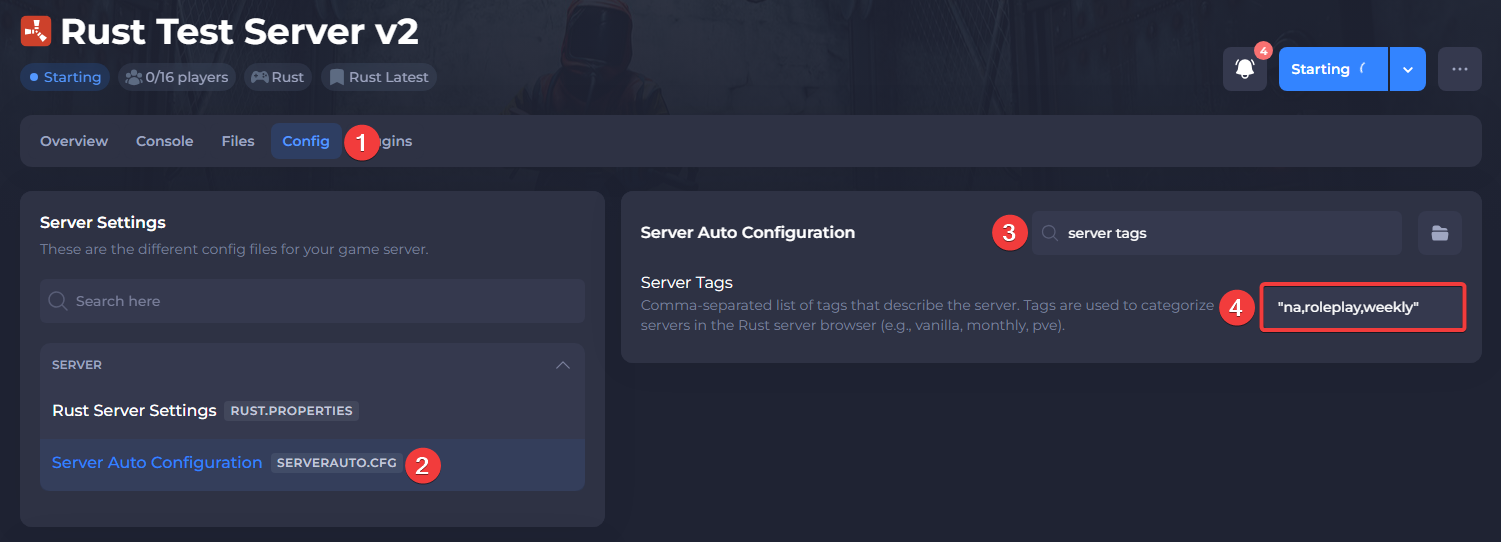
Navigate to the Config tab and open the Server Auto Configuration file.
-
Search for the "Server Tags" option and enter the tags you'd like (you must use their value displayed in the table above).
Tags are required in the following format: "monthly,vanilla,roleplay,na"
- Save the file and restart your server.