Table Of Contents
Changing the GamemodeStill have questions?
Come chat with us and we will get back to you as soon as possible!

Shockbyte
Support Team
How to Enable/Disable PvP on your Soulmask Server
Soulmask servers are set to PvE, or "Player vs. Environment" mode by default. This means that players cannot engage in combat with one-another. That being said, you can easily change between PvE and PvP, or "Player vs. Player" modes very easily on a Shockbyte Soulmask server.
#Changing the Gamemode
You can configure game type in your Soulmask server settings file, located on your server's control panel.
-
Access your Control Panel and Stop your server.
-
Navigate to the Config tab and locate the
Gamemodeoption. Select the dropdown and select your desired gamemode.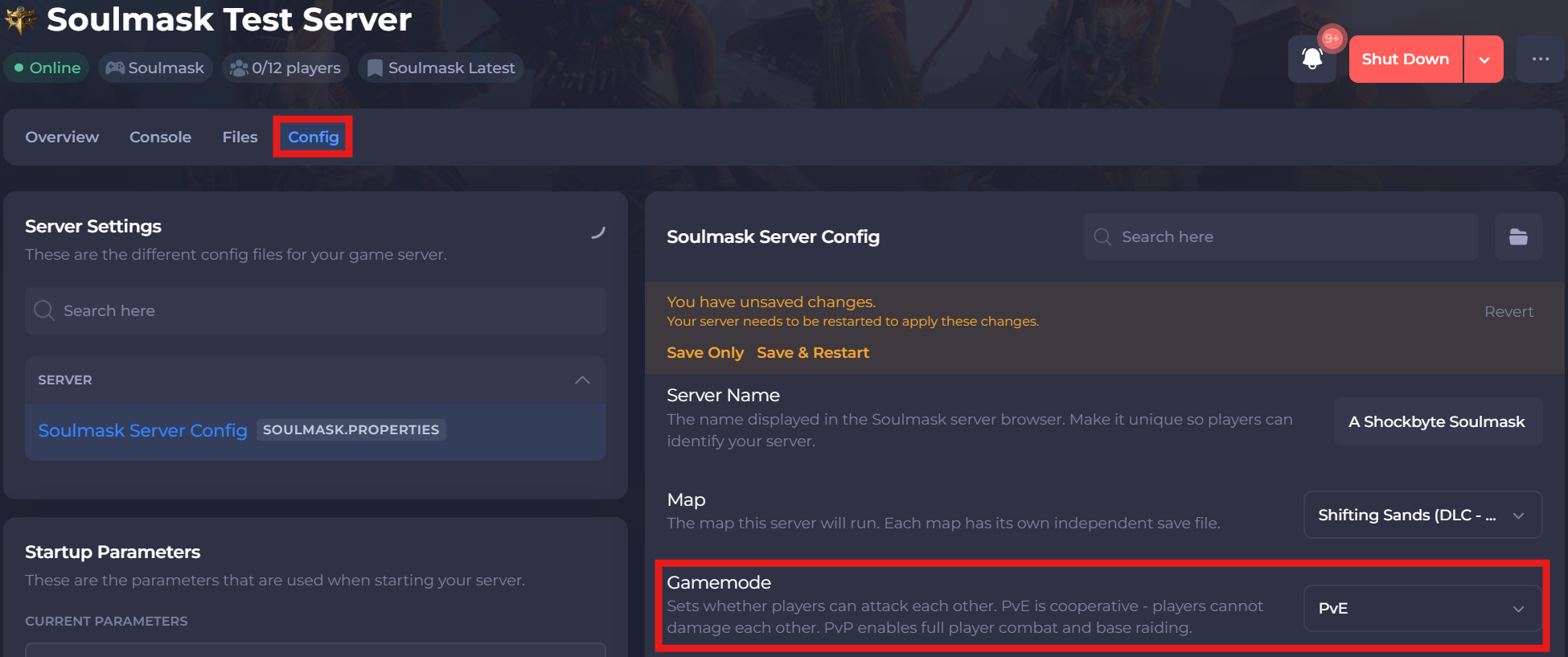
-
Save and restart your server to ensure the new changes apply.
If you require any further assistance, please contact our support at: https://shockbyte.com/billing/submitticket.php