Still have questions?
Come chat with us and we will get back to you as soon as possible!

Shockbyte
Support Team

How to Enable RCON on your Garry's Mod Server
RCON is an important protocol that allows you to execute commands without joining your server. Garry's Mod natively supports RCON, so setting it up is easy and straightforward.
#Enabling RCON in the Config
-
Access your Control Panel and Stop your server.
-
Navigate to the Config tab and select the Garry's Mod Game Settings.
-
Locate the
RCON Passwordsetting and set your desired RCON Password.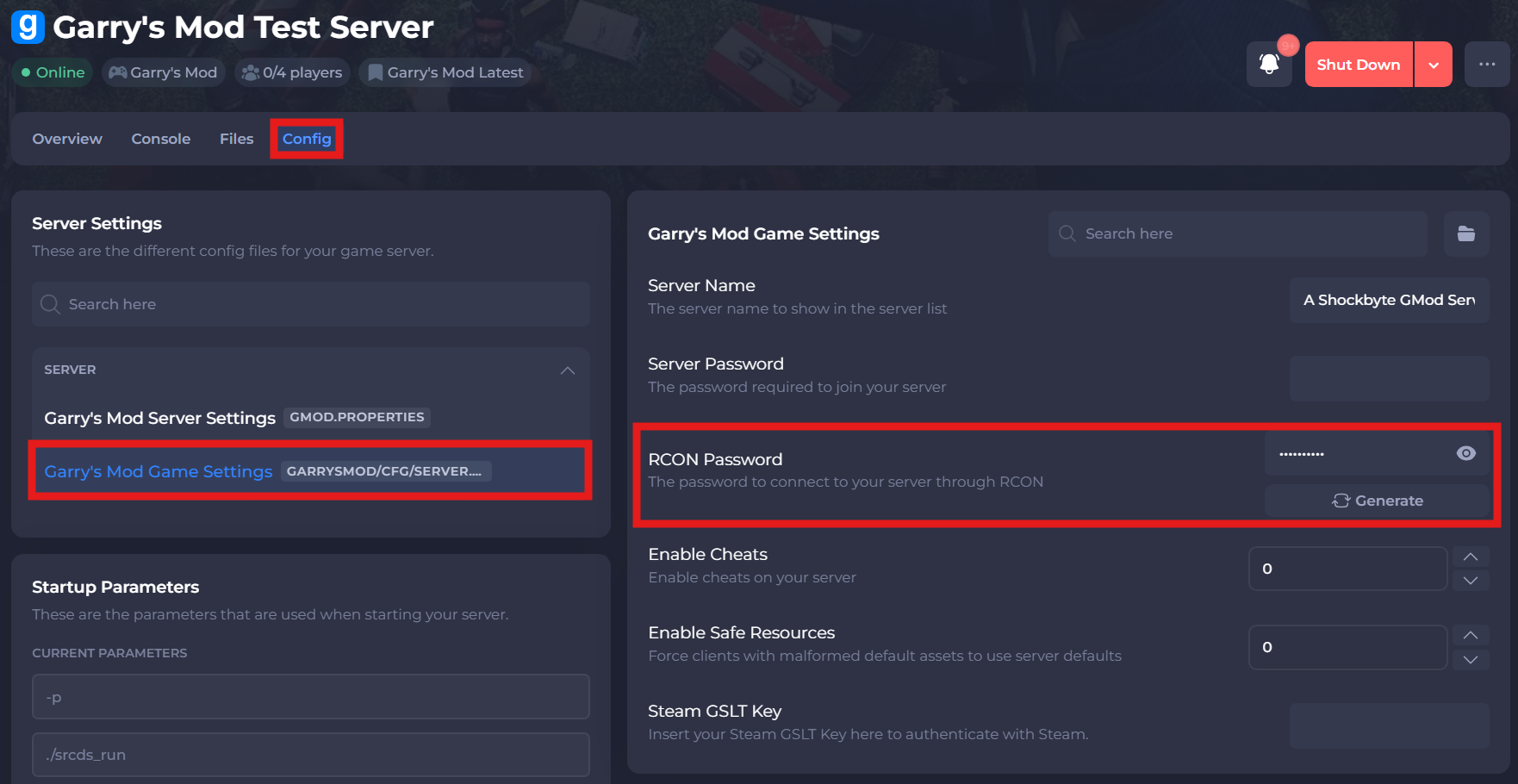
-
Save and restart your server to ensure the new changes apply.
#Setting Up RCON
RCON will be automatically enabled with a randomised password. You can find this password under the RCON Password value of the Garry's Mod Server Settings in the Config tab. Please see our guide that explains how to enable the in-game console on your Garry's Mod client before proceeding with the following steps:
- Enable and open the in-game development console.
- Join your server and open the console using the set keybind.
- Type
rcon_password_[PASSWORD], where [PASSWORD] is the password you set in the config earlier.
You can now execute a command with RCON by typing rcon followed by the command you wish to execute. As an example, you can run rcon status to see if everything is functional.
If you require any further assistance, please contact our support at: https://shockbyte.com/billing/submitticket.php