Table Of Contents
Resetting your Shockbyte ServerStill have questions?
Come chat with us and we will get back to you as soon as possible!

Jay Miller
Game Engineer
How To Reset Your Shockbyte Server Files
If you want to reset your Shockbyte server back to how it was originally or just kick things off fresh, you can easily wipe all the files.
Following this guide will erase everything permanently, so make sure to back up anything important before you proceed.
Important
Are you troubleshooting your server or testing a new modpack? Instead of deleting your server files, consider creating a New Instance: How to Create an Instance.
#Resetting your Shockbyte Server
You can reset your Shockbyte Server within the server files on your control panel.
-
Access your Server Panel and Stop your server.
-
Navigate to the Files tab.
-
Click on the Checkbox next to File Manager and then click Delete.
-
A window will appear, click on Delete if you wish to proceed with deleting your server files.
Important
Deleting files is a permanent and irreversible action. Make sure that a backup of your server files is created before deleting any files.
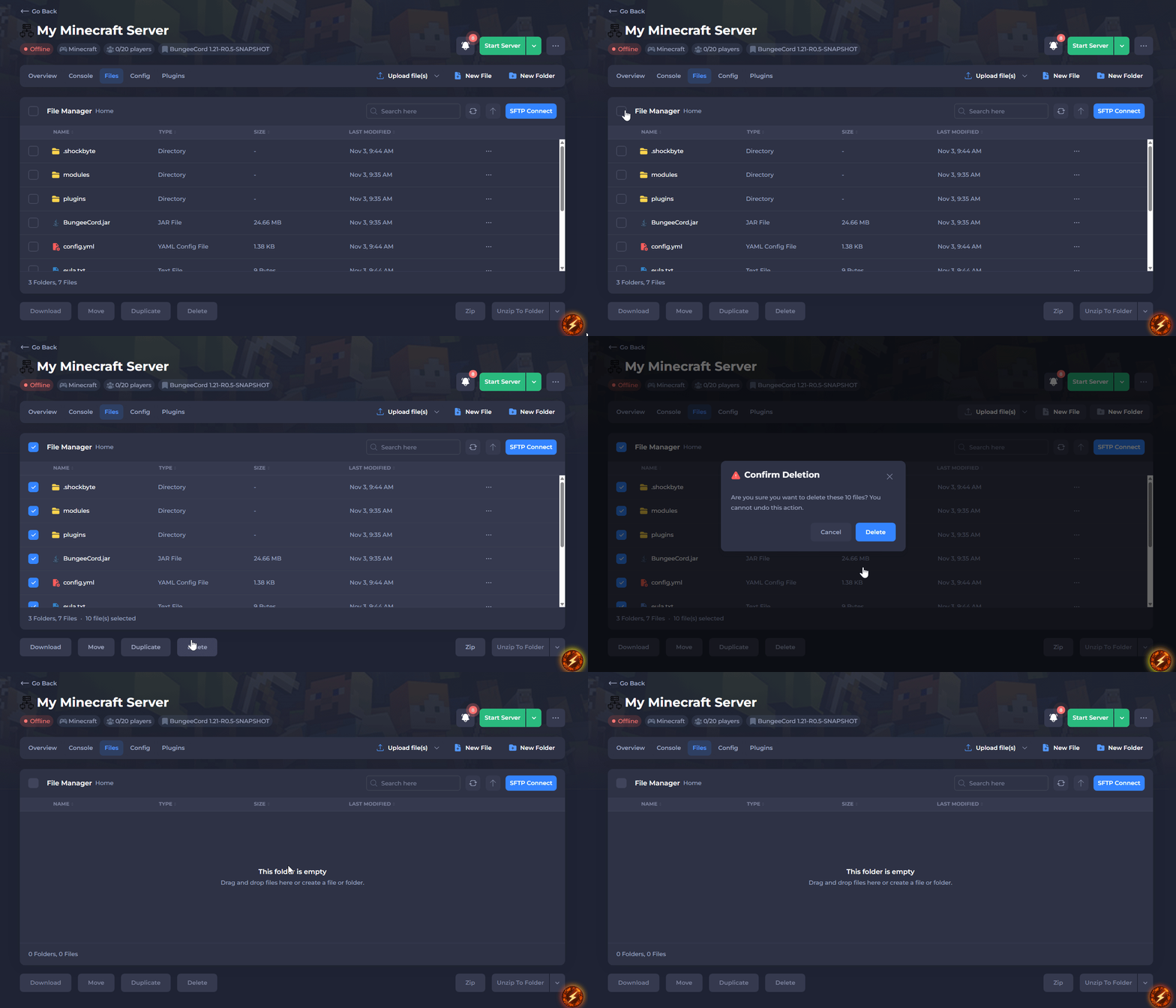
- Start your server to redownload the default server files.
Once you've gone through these steps, your server files will be deleted. Just start your server again to download everything fresh.