Still have questions?
Come chat with us and we will get back to you as soon as possible!

Shockbyte
Support Team

Why is my Server Suspended
Seeing your server listed as Suspended in the control panel means it has been temporarily taken offline and access to its services has been restricted. This guide explains the common reasons for server suspension and how to reactivate your server.
#Common Reasons for Suspension
Overdue Billing / Failed Renewal: The most frequent reason for suspension is an unpaid renewal invoice or a failed automatic renewal payment. When an invoice passes its due date without payment, our automated billing system temporarily suspends the service to prevent unexpected server usage charges.
Payment Disputes or Chargebacks: If a payment associated with your billing account is disputed, flagged for fraud, or reversed via a chargeback, the services tied to that payment are automatically suspended pending investigation.
Terms of Service (ToS) / Fair Usage Violations: Services may be suspended if they trigger system alerts for abuse (e.g., severe resource abuse impacting host node stability, unauthorized malicious scripts, or hosting forbidden content).
#How to Unsuspend Your Server
- Log in to your Shockbyte Client Area.
- Check the Overdue Invoices section on your dashboard for any overdue invoices.
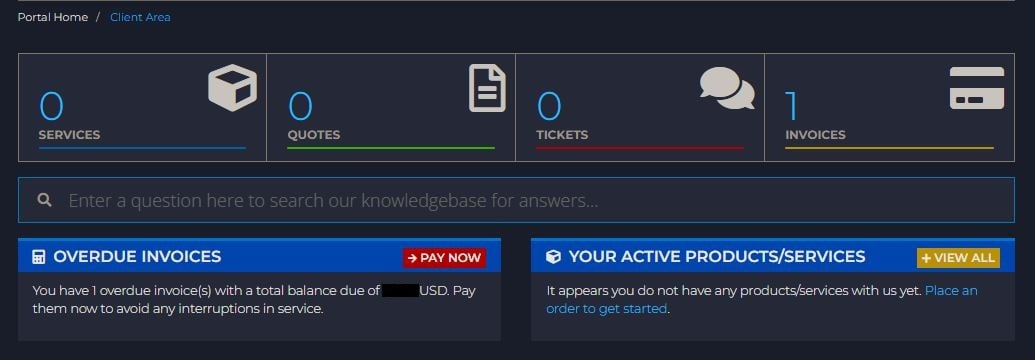
- Select the Pay Now button and complete the payment using your preferred payment method.
- Once payment is processed successfully, your server will be automatically unsuspended and restored within a few minutes.
Note
Depending on your payment method, it may take some time for your payment to appear on your invoice. If you pay via manual eCheck or bank transfer, the unsuspension process will complete automatically as soon as the funds clear.
#Data Retention & Suspension Notice
Suspension is not immediate cancellation. Your server files, world saves, and configurations remain completely intact during the suspension period.
To help you stay on top of your account status, our billing system sends multiple automated notifications to your registered email address before and during a suspension:
-
Pre-Due Date Reminder: An initial invoice notification is sent several days before your payment due date.
-
Overdue Notices: If payment is not received by the due date, you will receive overdue payment reminders urging you to settle the invoice to avoid disruption.
-
Service Suspension Notification: If the invoice remains unpaid after the grace period, your server is suspended, and you will receive a final suspension email warning.
Important
If the overdue invoice remains unpaid after 30 days of suspension, your server will be permanently terminated, and all associated files, backups, and data will be permanently deleted from our system.
You can find our full terms of service regarding payments here: https://shockbyte.com/legal/terms-of-service#payment
#Download Suspended Server Files
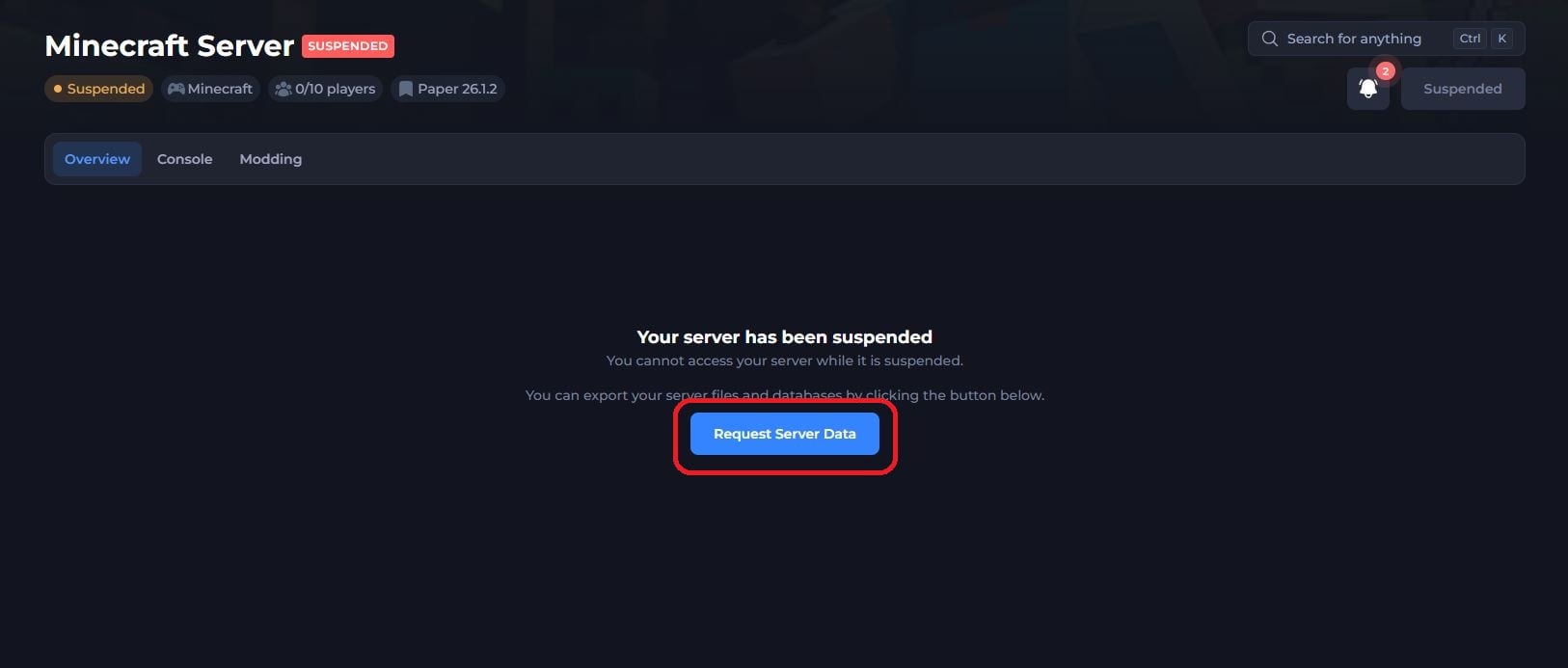
If your server is suspended and you wish to download a copy of your server files, you are welcome to do so by selecting the Request Server Data button when viewing your Control Panel.
#Frequently Asked Questions
I paid my invoice, but my server is still suspended. What should I do?
Check your invoice status in the Client Area to ensure the payment went through and shows as Paid. If the status is Paid and your server remains suspended after 15 minutes, please contact our support team.
What if I was suspended for abuse or a payment dispute?
If you have no unpaid invoices but your server is suspended, please check your registered email for a ticket notification from our Billing or Abuse team, or open a ticket with our support team.